
Pasting your best customer into a lookalike engine came back 40% usable. Writing down the 4 reasons that customer bought, turning each one into a filter, and running the search inside those filters came back 100% usable. Same customer, same database.
That gap is the whole argument for this piece. The deals you already closed and lost know more about your next list than any database filter does. Most teams never ask them.
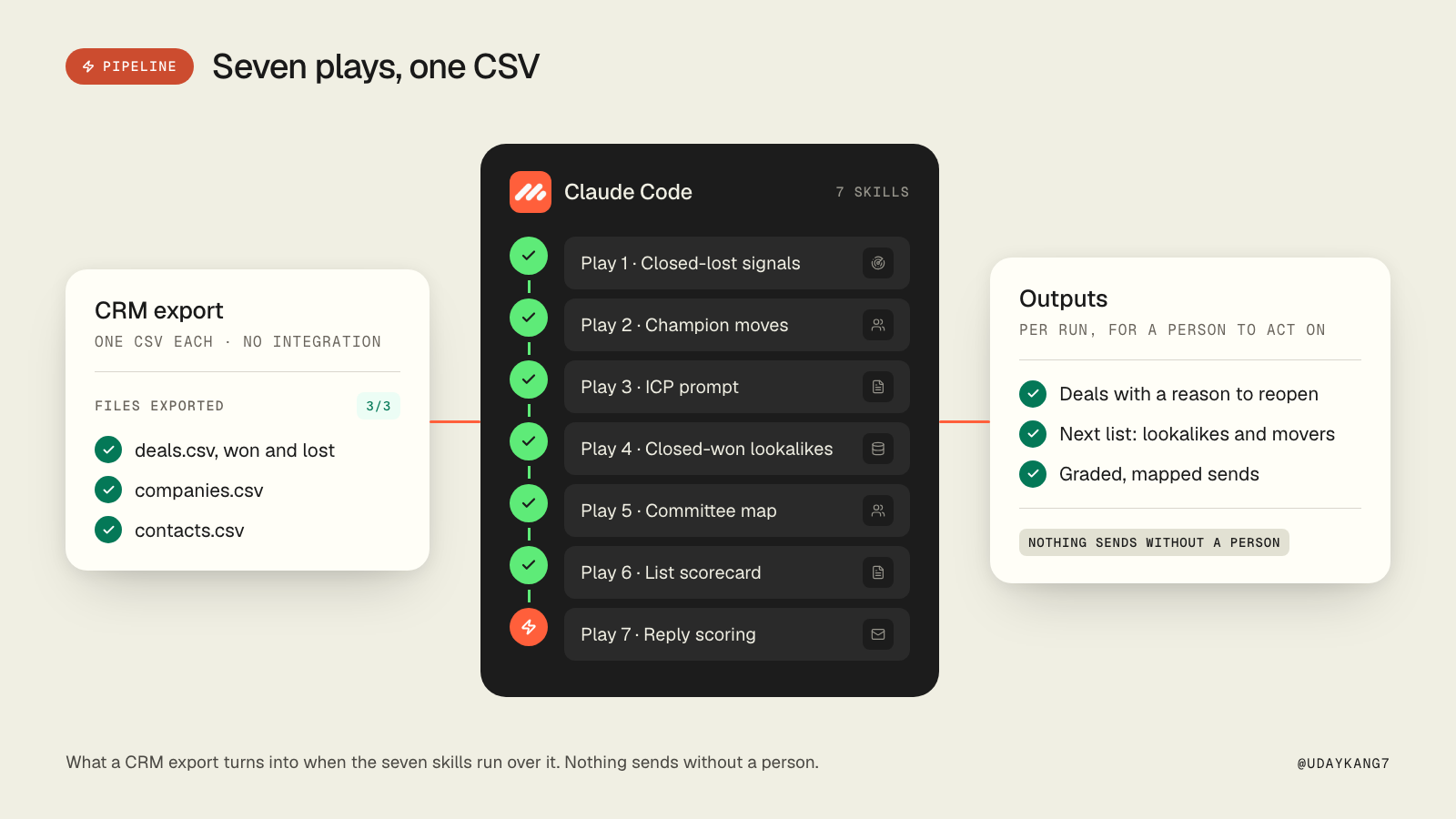
We run client pipelines from Claude Code with the GTM-Skills repo: 58 skill files, MIT licensed, bring your own keys. Each skill is a SKILL.md that Claude Code reads when the task matches, with the prompts, the scripts and the rules inside. This article walks through seven of them, in the order you would run them on a CRM export. Every code block below is an excerpt of the real file.
By the end, you will have:
- Closed-lost accounts ranked by what changed on their side since you lost them
- A monthly list of champions who moved, each already scored at the new company
- An ICP prompt that agrees with your own judgement on deals you won and lost
- Five lookalikes per closed-won deal, drafted from the deal owner, waiting for approval
- Four named people per account before the first email goes out
- A letter grade on every list before it touches a sender
- A positive reply rate, instead of a reply rate
This is for you if
You have a CRM with at least a year of closed-won and closed-lost deals in it. You, or someone on your team, can run Claude Code and export a CSV. You would rather spend an afternoon on your own deal history than another budget line on a bought list.
It is not a Claude Code tutorial, and it is not about picking a CRM. Nothing here needs a CRM integration for the first run. A CSV export is enough.
Before you start
The words you will see. Closed-lost: a deal that reached a stage and did not close, with a reason recorded, ideally in the buyer's words. Champion: the person who argued for you inside the account. Signal: a public change at a company (a round, a hire, a new leader) that hints it needs what you sell. ICP: the written description of who buys. Positive reply rate: interested, soft-positive and referral replies divided by total sent, not replies divided by total sent.
The tools. Claude Code with the GTM-Skills repo installed. A CSV export of your CRM (deals, companies, contacts). A people-data provider with your own key for plays 2, 4 and 5 (Prospeo and LeadMagic are what the skills reference). A live LinkedIn lookup for play 2. Smartlead for play 7, or any sender with a reply export. DNS, which is free, for play 6.
npx skills add automatewithuday/GTM-Skills \
  --skill playbook-hiring-surge --skill playbook-fundraising --skill playbook-new-in-role \
  --skill champion-move-detection --skill icp-prompt-builder \
  --skill closed-won-replication-play --skill playbook-lookalikes \
  --skill buying-committee-mapper --skill list-quality-scorecard \
  --skill email-gateway-detection --skill positive-reply-scoring -a claude-code -y
Play 1: Re-run buying signals on closed-lost
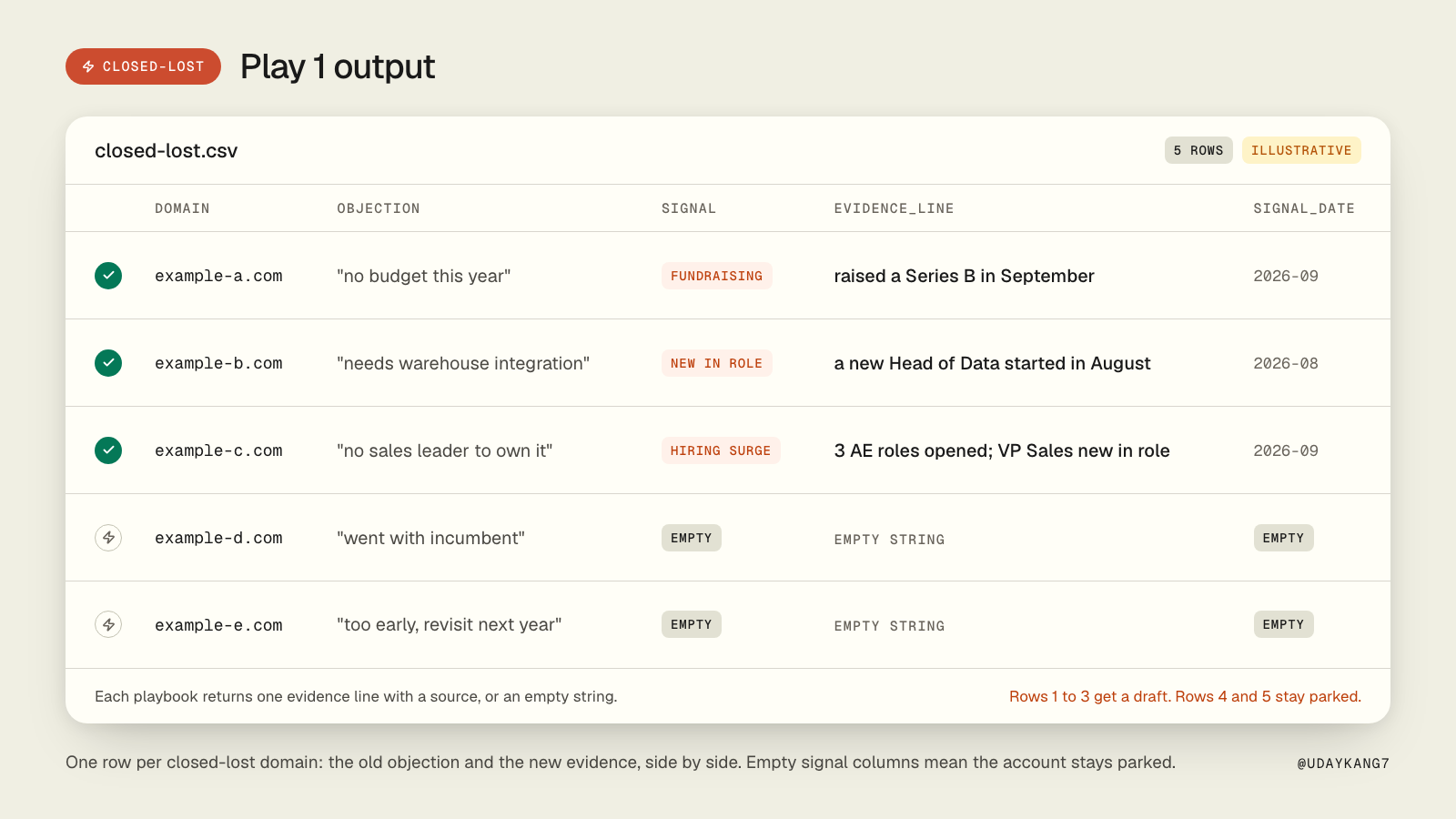
The mechanism: a closed-lost deal has an objection attached and a date. The objection was true on that date. The signal playbooks check whether the account has changed since: people starting new roles on the team that would use the product, a round raised, a new leader in the seat that said no. Each playbook returns one evidence line with a source, or an empty string. The rule inside every one of them is the same: never guess, never do arithmetic, return nothing rather than something plausible.
Do this:
- Export closed-lost deals from the last 12 months: domain, close date, the objection as the buyer said it. "Not interested" is a weak row. "Need the warehouse integration" is a row the play can check.
- Run the three signal playbooks over the domains with this prompt. First run read-only: no CRM writes.
Here is closed-lost.csv (domain, closed_date, objection, deal_owner).

For each domain run /playbook-hiring-surge, /playbook-fundraising and
/playbook-new-in-role. Return one table:

domain | objection | signal | evidence_line | source_url | signal_date

Rules: one row per domain. evidence_line is the playbook output, verbatim.
Empty string when nothing verified. No CRM writes. Do not draft outreach.
- The hiring-surge playbook is strict about what the number means. This is the rule that keeps the evidence line honest:
IMPORTANT: the number counts people who STARTED A NEW ROLE. Some of them
were hired from outside and some were promoted or moved internally. You
cannot tell which. So never say the company hired, added, brought on,
recruited, or grew by those people. Say that those people started new
roles, or are new in their roles.
- The fundraising playbook returns a contract, not prose:
{"funding_line": "...", "evidence_url": "...", "confidence": "high|low"}
If eligible is false the line is an empty string and confidence is low. Nothing else.
- Draft a follow-up only for rows where the signal answers the objection. The integration they needed now exists, or the person who said no has left and someone new is in the seat. Everything else stays parked.
Why it works: "checking in" tells the buyer nothing changed on your side. A new sales leader is something that changed on theirs, and the message can open with it. For one enterprise program this was the play that brought $250K of pipeline back, with programmatic display on the moved accounts between the signal check and the outreach.
Result: a ranked closed-lost list with the old objection and the new evidence on the same row, and a short list of accounts that have a reason to hear from you.
Play 2: Find out where your champions went
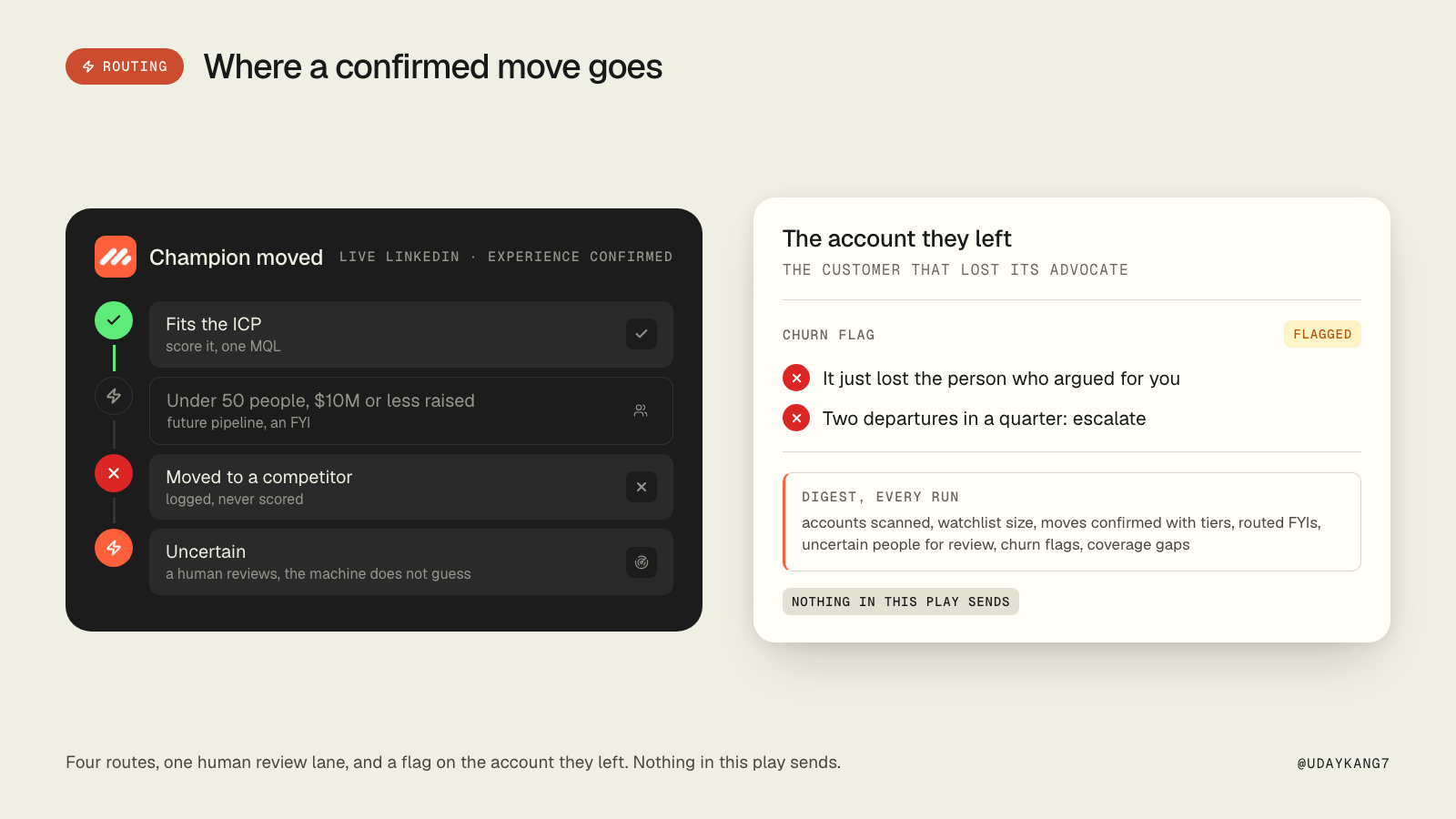
The mechanism: a person who bought from you once and moved is the highest-conversion signal you own, and the account they left just lost the person who argued for you. The skill keeps a watchlist of up to 5 people per closed-won account, checks each one against their live LinkedIn profile once a month, and scores a confirmed move at the new company. It never sends anything.
Do this:
- For every closed-won account, build the watchlist: the named champion, the economic buyer, and the heaviest hands-on user. The heaviest user is often not the person on the deal record, and a senior title is not required. Exclude consultants whose email domain is not the customer's.
- Persist it in the account's memory, in this shape:
[CHAMPION WATCHLIST], refreshed [date]
- [Name] | [title] | [email] | [LinkedIn URL] | [champion / economic buyer / heavy user: ~N usage/90d] | last verified [date]
- Once a month, check each person against their live profile. The guards that matter: a same-name profile at a different company is not a move; a stale headline is not a move; a move is confirmed only when the experience section shows the new company.
- Route each confirmed move. Into a company that fits: score it, one MQL per move. Into a company under 50 people with $10M or less raised: future pipeline, not a task for a rep today. Into a competitor: logged, never scored. Anything uncertain: a human looks, the machine does not guess.
- Flag the account they left for churn. Two departures from the same account in one quarter is the one to escalate.
- End the run with one digest: accounts scanned, watchlist size, moves confirmed with tiers, routed FYIs, uncertain people for review, churn flags, and coverage gaps.
Why it works: the first run is slow and partial, because it builds watchlists from messy records. Report the gaps in the digest instead of skipping accounts quietly, and coverage compounds month over month. The failure modes it exists to prevent are specific: a same-name stranger becoming a hot MQL, a stale headline hiding a move, the same move firing two months in a row, a free-trial signup treated as an advocate.
Result: a monthly list of warm companies with a known buyer inside, plus churn flags on the accounts those buyers left.
Play 3: Tune the ICP prompt on deals before it scores a list
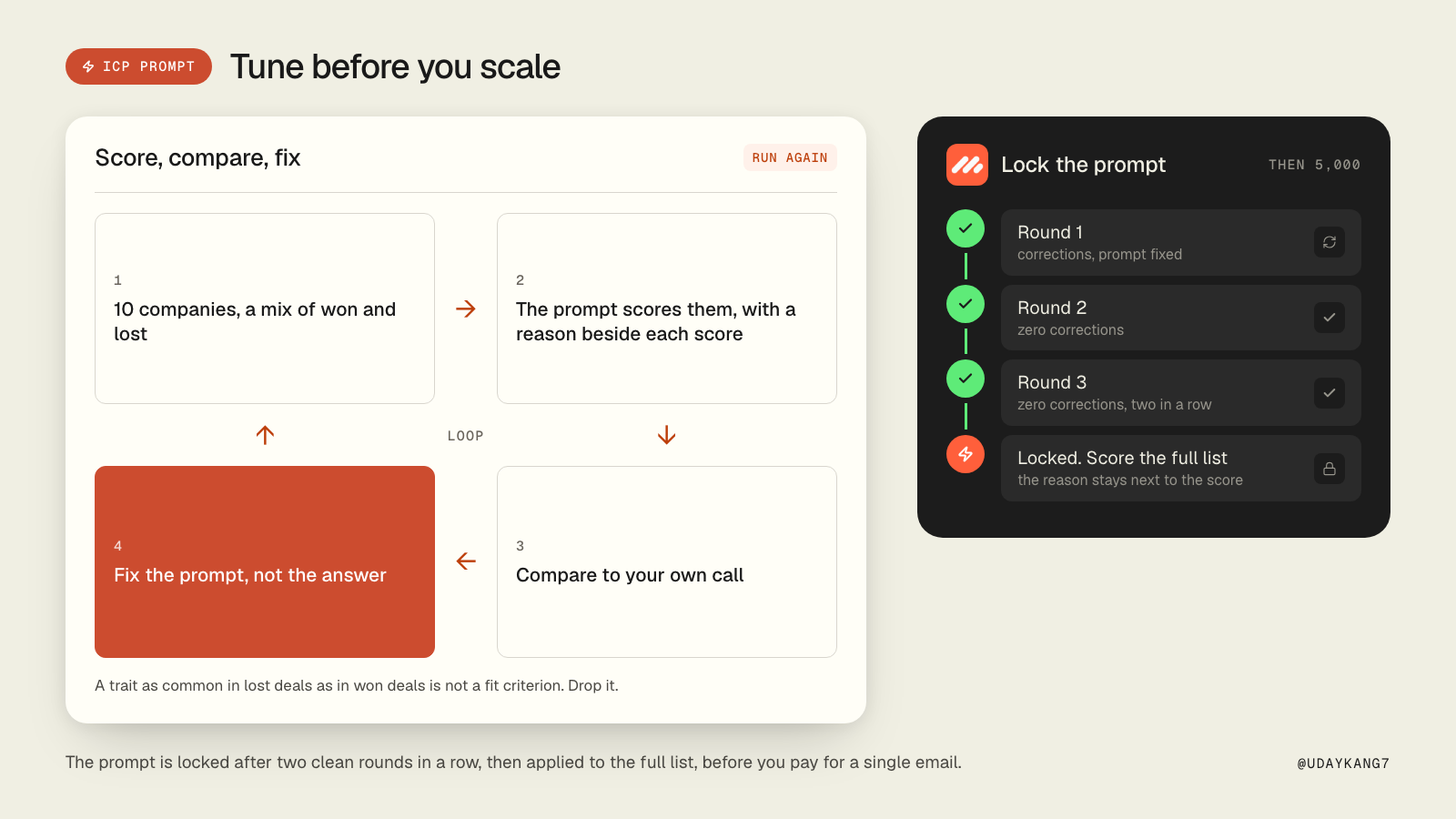
The mechanism: a list builder returns companies. It does not know whether they fit. If 80% of 5,000 companies are the wrong fit, you pay to enrich 4,000 emails that go nowhere. So the qualification prompt gets tuned on a small batch first, against your own judgement, and scaled only when it stops disagreeing with you.
Do this:
- Pull 10 to 20 companies from your deal history, a mix of ones you won and ones you lost. Each needs at least domain, name, industry, headcount and a description.
- Write the first prompt from your client profile:
You are an ICP evaluator for {CLIENT_NAME}.

## Target ICP
{ICP description}

## Qualification criteria (MUST be true)
- {criterion 1}
- {criterion 2}

## Disqualification criteria (ANY match = disqualify)
- {disqualifier 1}

## Output
For each company, return JSON:
{ "qualified": true | false, "confidence": 0.0-1.0, "reason": "one-sentence explanation" }
- Score the batch in Claude Code with sub-agents (no API key, your plan pays), and read the output beside your own call:
Company                   | Qualified | Conf | Reason
--------------------------+-----------+------+----------------------------------------
acme-corp.com             | YES       | 0.92 | B2B SaaS, 200 employees, target industry
random-nonprofit.org      | NO        | 0.95 | Nonprofit, not a business customer
edge-case-company.com     | YES       | 0.55 | Could fit but revenue model unclear
- Where the prompt and you disagree, fix the prompt, not the answer. Run again on a fresh 10.
- Lock it when it agrees with you two rounds in a row with zero corrections. Then apply it at scale, before you pay for a single email.
A trait that shows up as often in the deals you lost as in the deals you won is not a fit criterion, whatever the founder believes. Drop it.
Why it works: the reason column is the product. A rep who can see why an account ranked first trusts the list. A rep who cannot rebuilds it in Sales Navigator.
Result: a locked prompt with a dated tuning record, and a scored list where every row carries its reason.
Play 4: Turn a closed-won deal into the next list
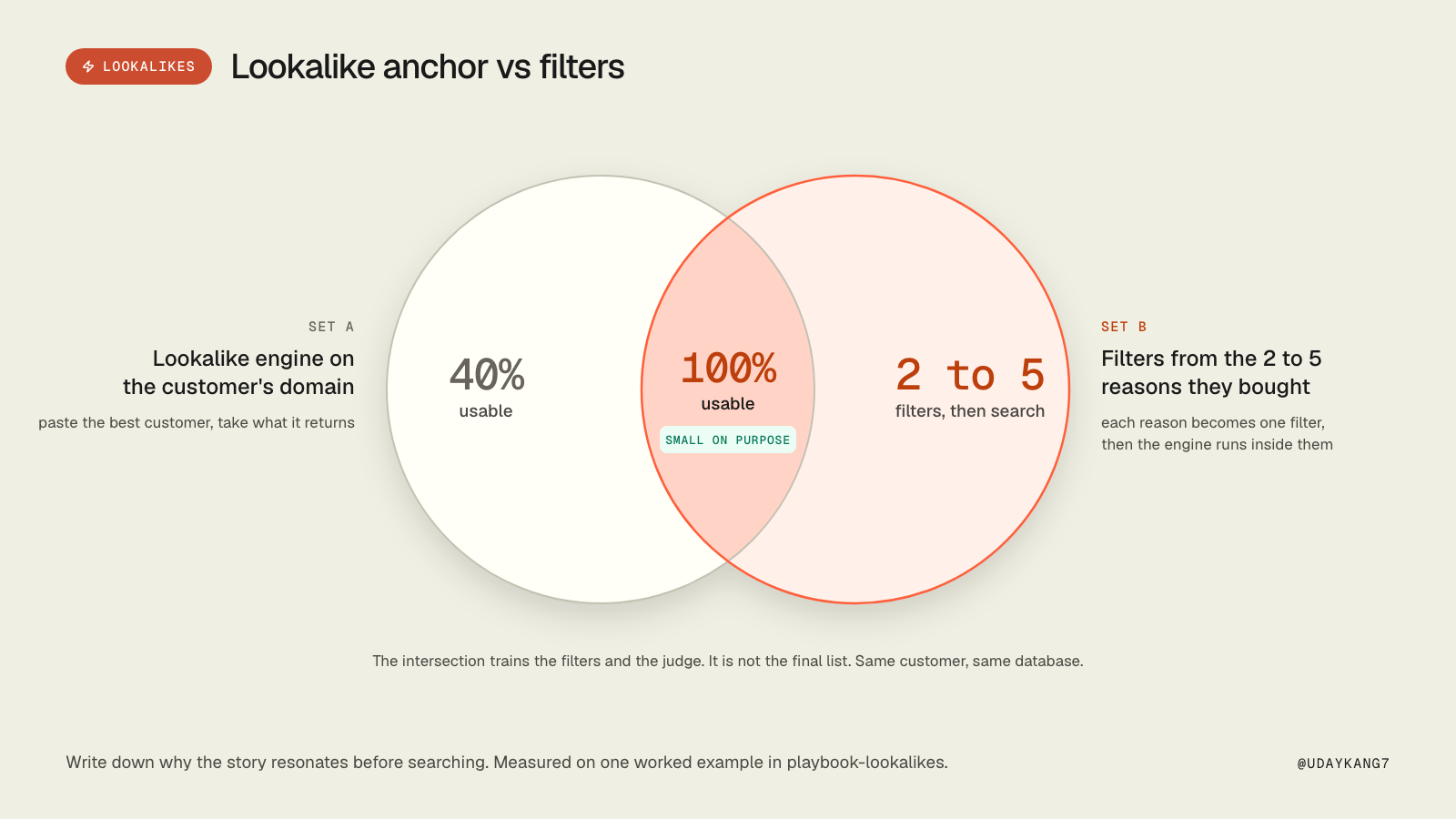
The mechanism: every closed-won deal is a targeting signal. The naive move is to paste the customer's domain into a lookalike engine and ship what comes back; measured on one worked example that was 40% usable, because the vector matched on "is about marketing" and returned agencies, a trade publication and a Power BI blog alongside real vendors. The precise move is to decompose why the story resonates into 2 to 5 attributes a database can filter on, intersect those filters with the lookalike anchor, and read the result. That intersection measured 100% usable.
Do this:
- The moment a deal closes, extract the win profile from the deal and the company: industry, headcount band, geography, stack if visible, the problem that drove the purchase, the deal owner.
- Have the decomposer turn the story into filters:
{"resonance_reasons": ["..."], "industry_enum_candidates": ["..."],
 "keywords_include": ["..."], "keywords_exclude": ["..."],
 "headcount_min": 0, "headcount_max": 0, "geography": "...",
 "descriptor": "...", "confidence": "high|low"}
Each resonance reason has to be testable against a company description. "B2B software vendor, product is marketing technology, US, 50 to 2,000 people" is four testable reasons. "Innovative companies" is none.
- Run the search inside the filters. 5 lookalikes per win, none already in the CRM as a customer, open deal or contact's company. If you cannot reach 5, broaden one criterion at a time, geography first, and flag the count.
- Find the same persona as the champion in the won deal at each lookalike, and one specific detail to write from.
- Draft one message per company from the deal owner, with the win referenced anonymously: "a B2B SaaS company scaling their outbound motion", never the customer's name. Do not say you found them because of another customer. The win informs the angle; the mechanism stays inside.
- One batch review task for the deal owner: the profile used, the table of companies and drafts, anything skipped. Nothing sends without approval.
Why it works: a case study only lands on someone who recognises themselves in it. The intersection is small, and that is the point: it teaches you the filters and trains the judge. It is not the final list.
Result: each win produces a reviewed batch of five accounts and five drafts, from the person who can speak to the win.
Play 5: Map the committee before anyone sends
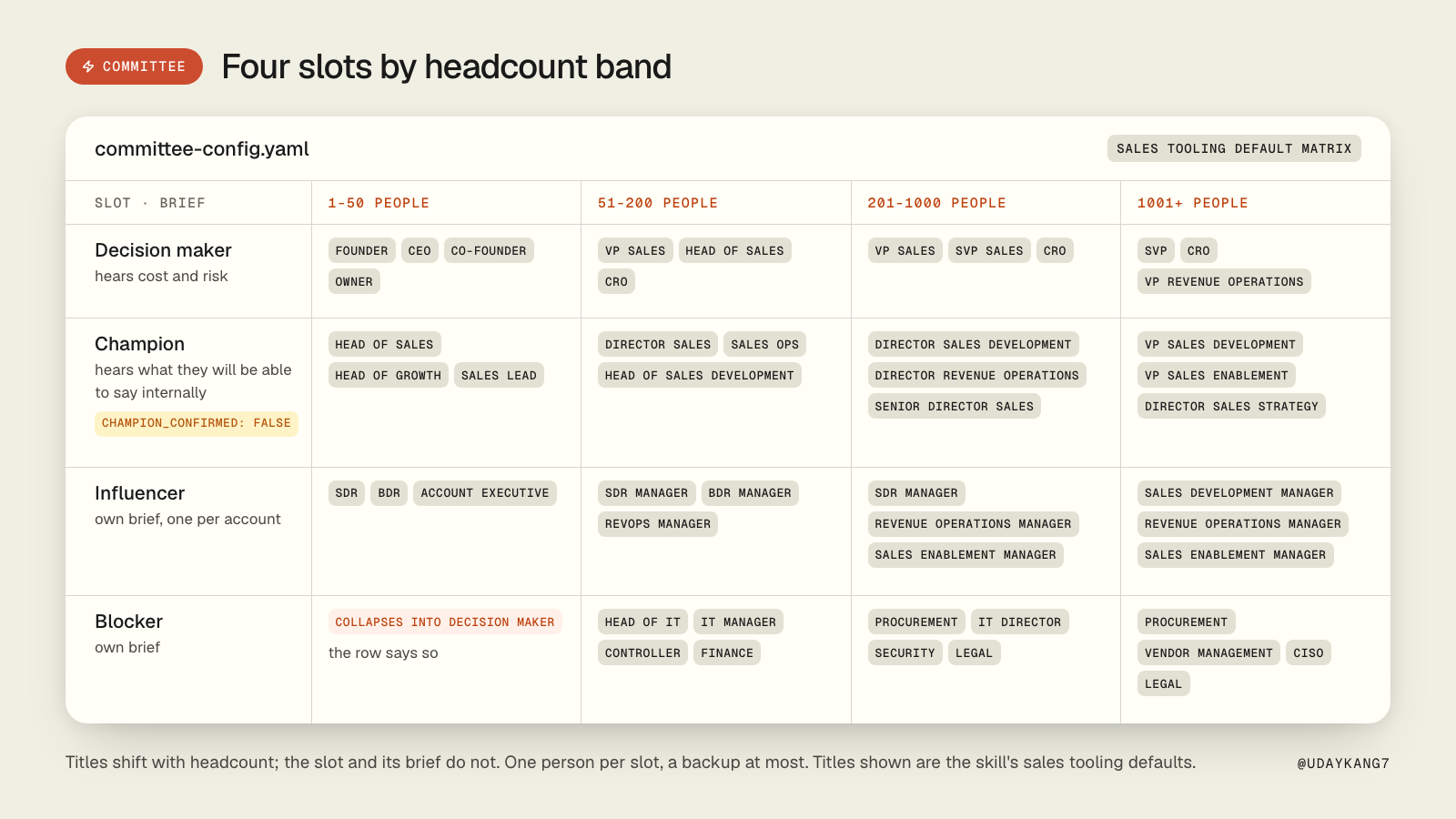
The mechanism: a qualified account is not a contact. For each account, four slots get mapped by title and headcount band at the list level, decision maker, champion, influencer, blocker, one person per slot and a backup at most. Each slot has its own brief, so the four people at one company get four different emails. The same email to all four is a blast.
Do this:
- Write the committee config once. Titles shift with headcount, so the matrix is per band:
buying_committee:
  bands:
    - { id: "1-50",     min: 1,    max: 50 }
    - { id: "51-200",   min: 51,   max: 200 }
    - { id: "201-1000", min: 201,  max: 1000 }
    - { id: "1001+",    min: 1001, max: null }
  slots:
    decision_maker:
      owns: "budget and the final yes"
      fears: "cost, risk, a vendor that embarrasses them"
      message_gets: "cost and risk"
      titles_by_band:
        "1-50":     ["founder", "ceo", "co-founder", "owner"]
        "51-200":   ["vp sales", "head of sales", "cro"]
        "201-1000": ["vp sales", "svp sales", "cro"]
        "1001+":    ["svp", "cro", "vp revenue operations"]
      negative_titles: ["assistant", "intern", "former"]
    champion:
      owns: "the problem day to day, wants to be seen solving it"
      fears: "backing something that fails internally"
      message_gets: "what they will be able to say internally"
- Tag the contacts against the matrix:
npx tsx scripts/tag-slots.ts \
  --contacts=contacts-raw.csv \
  --matrix=committee-config.yaml \
  --accounts=qualified-accounts.csv \
  --out=committee-map.csv \
  --report=coverage-report.md
- Read the map. At a 20-person company the founder is the decision maker and the blocker, so the slot collapses and the row says so. Confidence is title-match certainty, not email certainty: 0.95 for an exact title, 0.85 for a pattern match, and multiplied by 0.7 when headcount was blank.
- Leave
champion_confirmedat false. It flips only after a real reply. Titles tell you who is likely to care; the call tells you who does.
Why it works: on 1,000 accounts the mapper typically fills 3.1 slots per account after collapses and gaps, so 3,100 contacts, from 16 searches instead of 1,000. Reps open an account with four names and four reasons attached. Searching LinkedIn account by account is the list's job, not the rep's.
Result: committee-map.csv, one row per person per slot, with the brief each person's message follows.
Play 6: Grade the list before it touches a sender
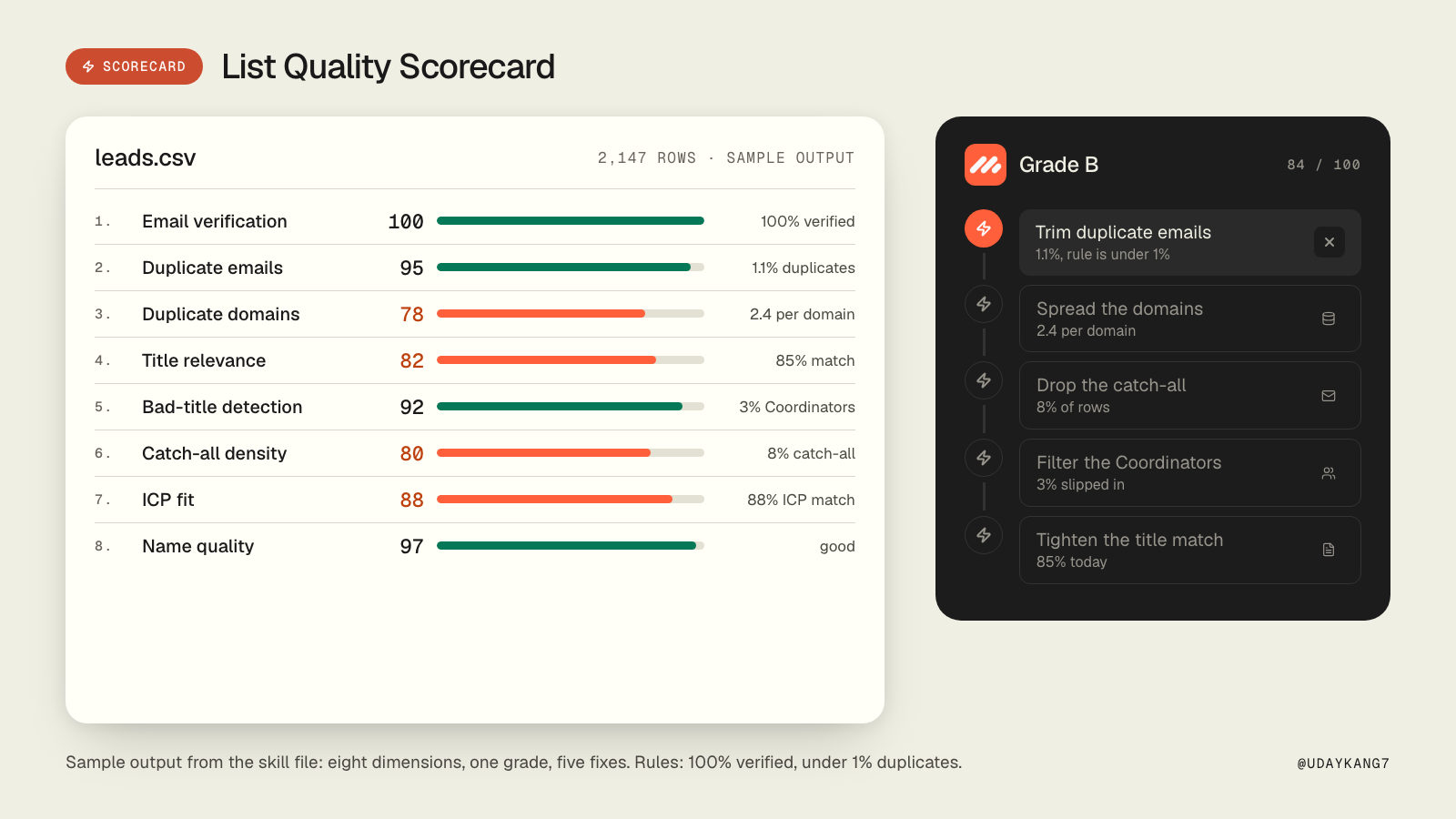
The mechanism: a CSV of 5,000 leads is not a good list of 5,000 leads. The three failure modes cold email runners hit most are a bad list, unverified emails, and ICP drift (you think you target VPs, the list is mostly managers). Each is catchable before a send, in minutes, for free. The scorecard grades eight dimensions and returns a letter.
Do this:
- Run the scorecard on the enriched list, with the client profile so it can compare against the declared ICP:
npx tsx scripts/score-list.ts --list=leads.csv --icp-file=client-profile.yaml --out=scorecard.md
- Read the grade and the top five fixes. Sample output from the skill file:
=== List Quality Scorecard ===

File: leads.csv (2,147 rows)
Grade: B (84/100)

1. Email verification:    100/100  (100% verified, good)
2. Duplicate emails:       95/100  (1.1% duplicates, trim before send)
3. Duplicate domains:      78/100  (avg 2.4 per domain, some over-concentration)
4. Title relevance:        82/100  (85% titles match "VP Sales" / "Head of Sales")
5. Bad-title detection:    92/100  (3% Coordinators slipped in, filter)
6. Catch-all density:      80/100  (8% catch-all, consider dropping)
7. ICP fit:                88/100  (88% match declared industry filter)
8. Name quality:           97/100  (good)
The two rules that are not negotiable: 100% of a cold list verified before it sends, and duplicates under 1%.
- While the list is open, check what sits behind each domain. Proofpoint, Mimecast, Barracuda, Cisco IronPort, Google, Microsoft. DNS gives you the gateway for free, so stop paying a data vendor for the MX provider:
pip install dnspython
python scripts/detect_gateway.py --in domains.csv --out final.csv
- Enrich the empty fields once and cache the result. In our account-enrichment pipeline that is about $0.13 per account with gateway detection, and the pipeline never pays twice for the same data.
Why it works: bounces burn domain reputation, and a burnt domain takes months to recover. Everything on the scorecard is cheaper to fix on a Tuesday afternoon than after the send.
Result: a letter grade, the five fixes, and a gateway column, before anything goes near Smartlead.
Play 7: Score the replies, not the reply rate
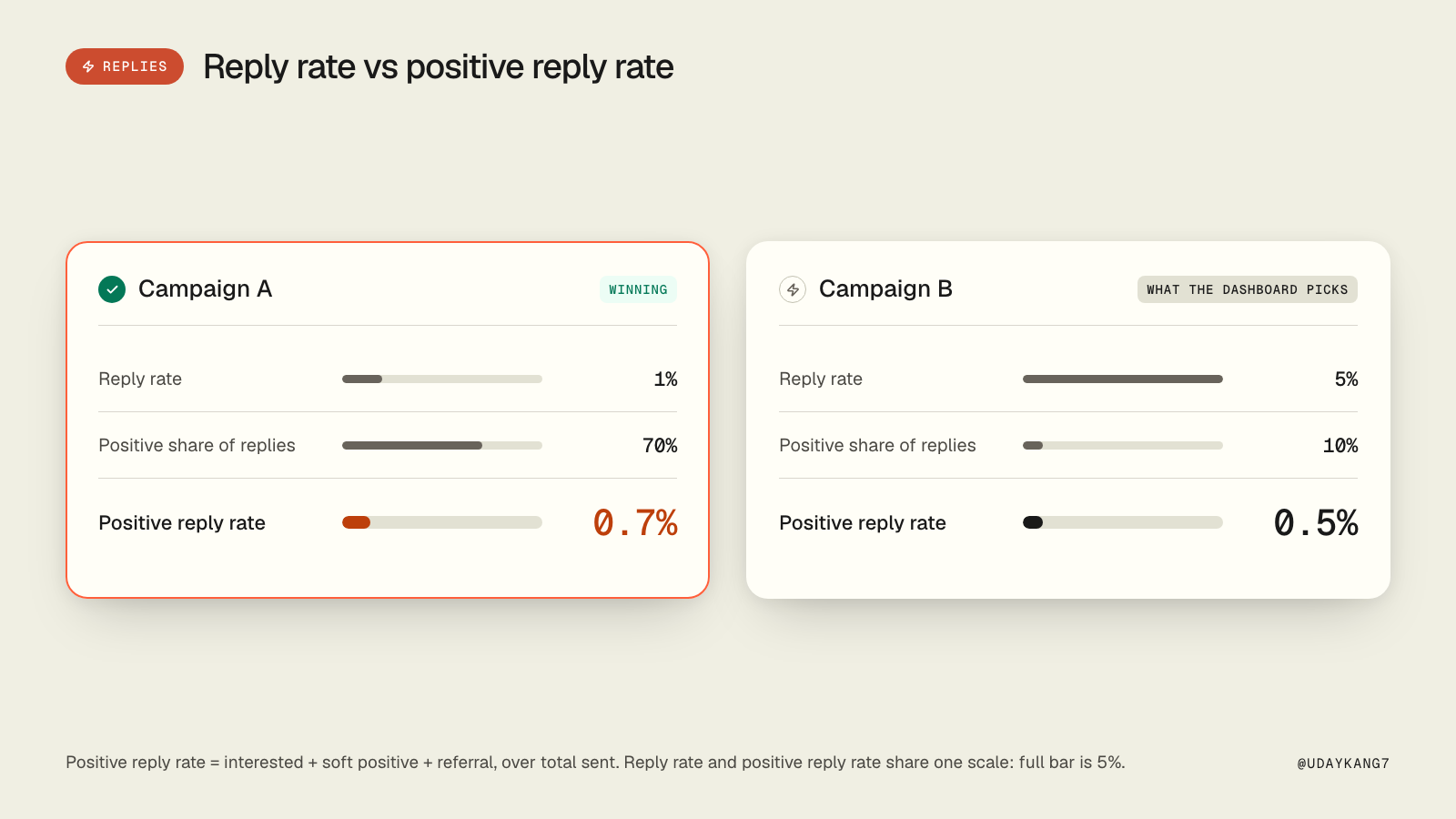
The mechanism: reply rate tells you whether people are paying attention. Positive reply rate tells you whether they want what you sell. A campaign at 5% reply rate can be a disaster if 90% of those replies are unsubscribes and "not a fit".
Do this:
- Every Wednesday, pull the replies from campaigns active in the last 7 days:
npx tsx scripts/fetch-campaign-replies.ts --campaign-id=12345 --out=/tmp/replies.json
- Classify each reply into exactly one bucket:
Classify each reply as one of:
- positive_interested, positive_soft, positive_referral
- neutral_question
- negative_notnow, negative_notfit, negative_hostile
- unsubscribe, ooo, bounce, other

For each reply, output: { lead_id, label, confidence: 0.0-1.0, one_line_reason }

Rules:
- "Take me off your list", "unsubscribe", "STOP" → unsubscribe
- "Not right now, circle back in Q3" → negative_notnow
- "Try [other person]" → positive_referral
- "Send more info" or "Tell me more" → positive_soft
- "Yes, let's book a call", "what times work" → positive_interested
- Aggregate. Out-of-office and bounces leave the denominator.
positive_reply_rate = (positive_interested + positive_soft + positive_referral) / total_sent
- Compare campaigns on that number. A campaign at 1% reply rate and 70% positive sits at 0.7%. A campaign at 5% reply rate and 10% positive sits at 0.5%. The first one is winning, and the dashboard says otherwise.
- Return the referrals and the "not now" replies with a date. Referrals are the highest-value reply on the list; "not now" with a quarter attached is next quarter's list.
Why it works: the 1% bar on positive reply rate is the number the whole program is judged on. Everything upstream, the list grade, the committee map, the signal check, exists to move it.
Result: a weekly positive reply rate per campaign, a referral list, and a dated "not now" list.
Your first week
Day 1: export closed-lost, closed-won, companies and contacts to CSV. Install the skills. Day 2: run play 1 on 5 closed-lost domains, read-only. Read the evidence lines and the sources. Day 3: run play 3 on 10 companies you won and lost. Fix the prompt until it agrees with you. Day 4: run play 5 on the accounts play 3 qualified. Read the coverage report. Day 5: run play 6 on the contacts play 5 produced. Fix the top five issues. Nothing sends this week.
Plays 2, 4 and 7 run on their own clocks: monthly, on every closed-won, and every Wednesday.
Start with 5 closed-lost deals. If the signal columns come back empty, that is the answer for this month, and it cost you an afternoon instead of a list.
Every play above is a skill file with the full prompts, scripts and rules inside: github.com/automatewithuday/GTM-Skills. Web versions are in the GTM skills library.